CI/CD Pipeline Design & Automation using GitHub Actions and GitHub Pages
Introduction
Continuous Integration and Continuous Deployment (CI/CD) is a DevOps practice that automates the process of building,
testing, and deploying software. Rather than manually testing and publishing every code change,
a CI/CD pipeline ensures that each update is automatically validated and, if successful, deployed to production.
This reduces human error, speeds up software delivery, and improves software quality.
In this implementation, GitHub serves as the source code repository, GitHub Actions provides workflow automation,
and GitHub Pages hosts the final web application or documentation.
CI/CD Pipeline Components
1. GitHub Repository
The GitHub repository acts as the central location where the application's source code
is stored. Developers work on their local machines and commit changes using Git.
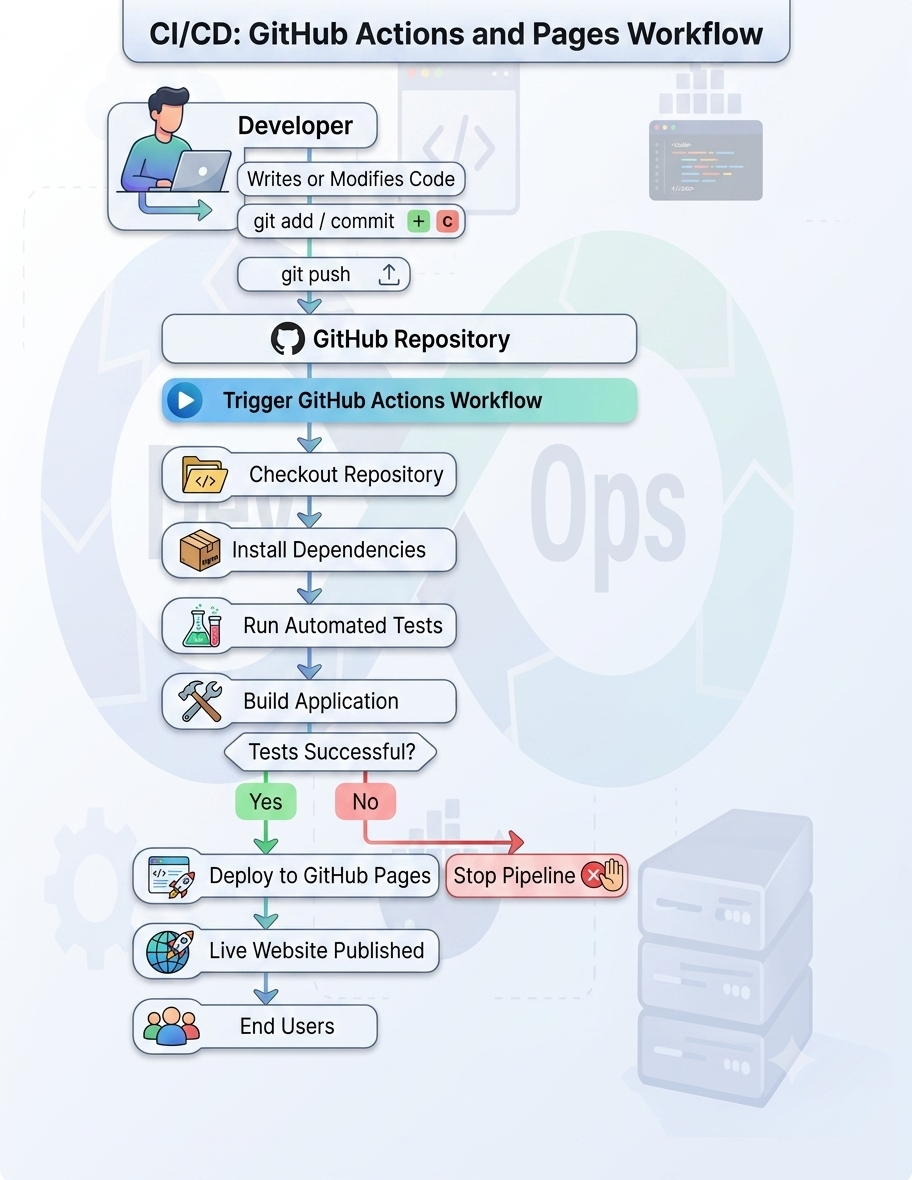
Every push to the repository automatically triggers the CI/CD pipeline.
2. Continuous Integration (CI) using GitHub Actions
When code is pushed to the repository, GitHub Actions executes a predefined workflow described in a YAML configuration file located in:
.github/workflows/
Typical CI tasks include:
- Checking out the latest source code
- Installing project dependencies
- Running unit tests
- Performing code quality checks
- Building the application
If any step fails, the pipeline stops and reports the failure to the developer.
This process ensures that every code change is verified before deployment.
3. Continuous Deployment (CD)
If all CI stages complete successfully, the deployment stage begins automatically.
For a static website, GitHub Actions publishes the generated files to GitHub Pages.
Deployment includes:
- Packaging the website
- Uploading build artifacts
- Publishing to GitHub Pages
Users can then access the updated website through the GitHub Pages URL.
GitHub Pages
GitHub Pages is a static web hosting service integrated with GitHub.
After deployment, the website becomes publicly accessible without requiring a separate web server.
Typical uses include:
- Project websites
- Documentation
- Portfolio websites
- Static web applications
Complete CI/CD Pipeline Architecture